


Introduction
SQL is the most popular language of the relational database management systems (RDBMS) across the world. Several RDBMS packages like Oracle, DB2, MySQL, Microsoft SQL Servers, PostgreSQL etc. use SQL as the primary language to interact with database. Relational database stores data in tabuler format where data is stored in rows and columns of a table. Each row of the table represents the single entity (example: employee, customer or sales). Each column of the table represents the attribute of the entity (example: employee name of employee, customer address of customer etc.). There is some attribute or group of attributes that uniquely identifies an entity or a row in the table/entity set is called as primary key.
Sometime, one table is associated with other table(s) with common attribute(s)/column(s). Those common attibute(s)/column(s) value references the other table. It is called foreign key. Using foreign keys more than one tables are joined to get combined results.
This article discusses on several aspect of subqueries used in SQL. Here, we will discuss on following topics:
- What is subquery?
- What are the different types of subquery?
- Scalar
- Multi row
- Corelated
- Nested subquery.
- How does SQL engine process a SQL statement containing subquery?
- What are SQL clauses that can hold subqueries?
In this article we will consider MySQL database. But the same knowledge can be applicable in any RDBMS packages.
Subquery
A Subquery is a SQL query (SELECT query) that can be placed inside another SQL commands (SELECT, INSERT, DELETE, or UPDATE).
The SQL engine processes the subquery first, then it processes the outer query or main query as a whole.
Schema Definition:
Let us consider the MySQL database COMPANY which have following tables.
Table: employee
It has following columns:
- emp_id
- emp_name
- dept_name
- salary
emp_id is the primary key.
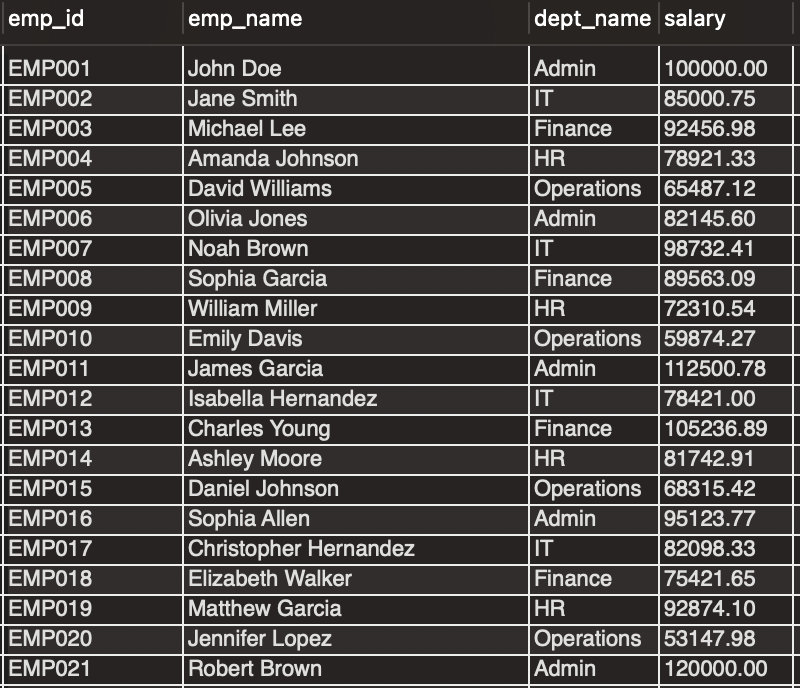 employee Table
Table: department
It has following columns:
- dept_id
- dept_name
- dept_loc
dept_id is the primary key.
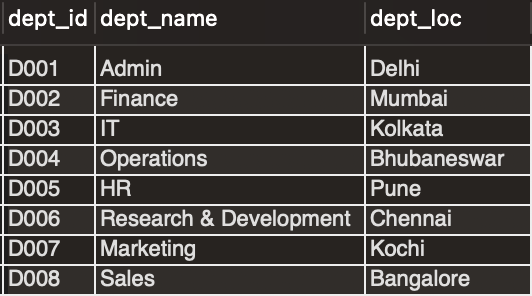 department Table
Table: sales
It has following columns:
- sales_id
- sales_date
- product_name
- store_id
- store_name
- quantity
- price_amount
sales_id is the primary key.
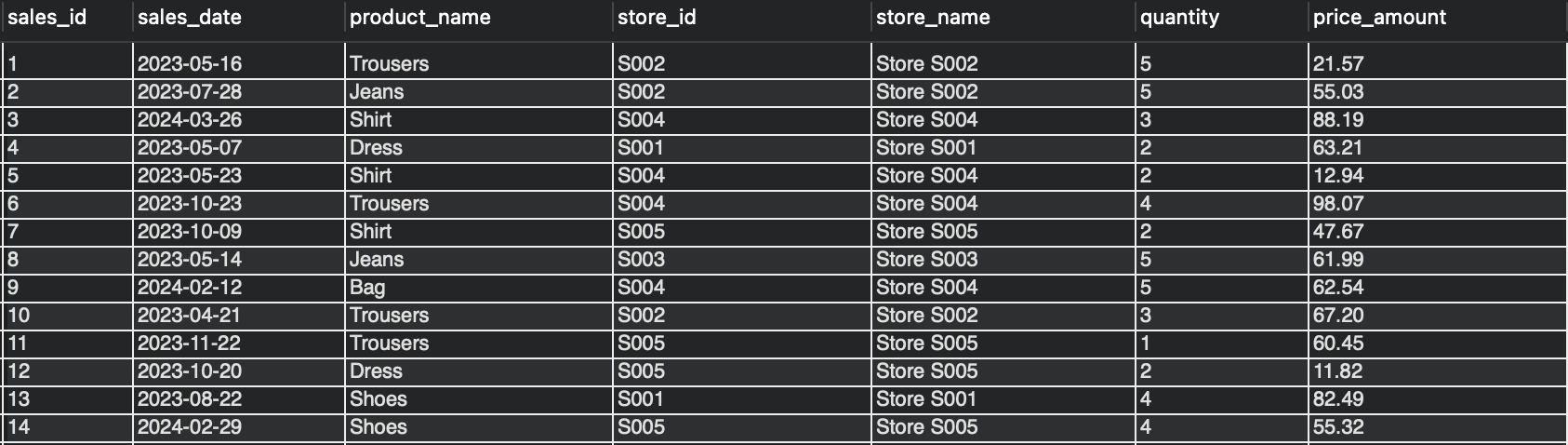 sales Table
Now, we will solve following question using subquery.
Question 1
Find the employees whose salary is more than the average salary earned by all employees.
Solution 1
The solution of the question can be divided into following parts:
- Find average salary earned by all employees.
- Find the employee details whose salary is greter than the average salary in point 1.
We can use following two query to solve the question.
select avg(salary) from employee; -- 85705.693000
select * from employee where salary > 85705.693000;
We can replace the hardcoded value of the average salary (85705.693000) by the first query to get more dynamic query.
select * -- Outer Query / Main Query
 from employee
 where salary >
 (select avg(salary) from employee); -- Subquery / Inner Query
The result we get as follows in both of the way:
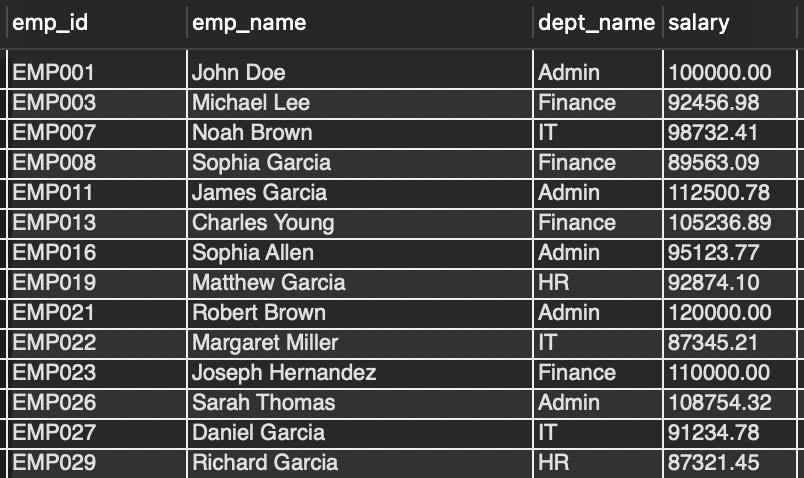 Result 1
Different Types of Subquery
There are roughly three types of subqueries as follows:
- Scalar Subquery.
- Multiple Row Subquery.
- Corelated Subquery.
Scalar Subquery
The Scalar Subquery always returns a single value i.e. the result with one row and one column.
The subquery in Solution 1 is the example of scalar subquery as it always return a single value i.e. the average salary of all the employees.
There is another way to write the Solution 1 subquery.
select e.*
 from employee e
 join (select avg(salary) as sal from employee) avg_sal
 on e.salary > avg_sal.sal;
Multiple Row Subquery
The Multiple Row Subquery returns multiple rows. Based on the number of columns it returns, it can be sub devided into folowing types:
- Subquery returns multiple rows and one column.
- Subquery returns multiple rows and multiple columns.
Now we will see both of multiple row subqueries in examples.
Question 2
Find the department details which do not have any employee.
Solution 2
select *
 from department
 where dept_name not in
(select distinct dept_name from employee);
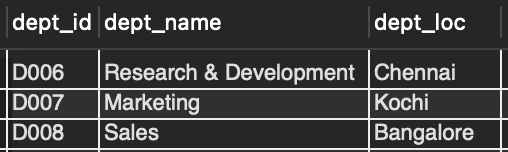 Result 2
Question 3
Find the employees who earn hightest salary in each department.
Solution 3
The solution of the question can be devided into following parts:
- Find the department name and highest salary in each department.
- Find the employees comparing the result set in point 1.
For the point 1, we can write following query.
select dept_name, max(salary)
 from employee
group by dept_name;
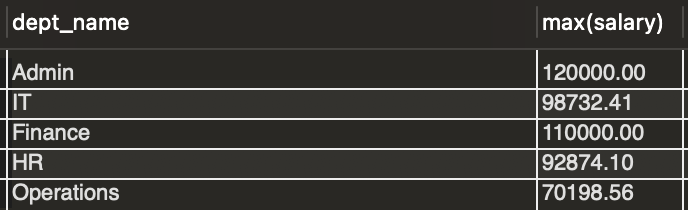 Result 3
Then for the point 2, we write the final query.
select *
 from employee
 where (dept_name, salary) in (select dept_name, max(salary)
 from employee
 group by dept_name);
 Result 4
Corelated Subquery
The Corelated Subquery is the subquery which is dependent or related to the outer/main query. The execution of the corelated subquery is dependent on some value from the outer query.
We will understand it using the following example.
Question 4
Find the employee in each department who earn more than the average salary in that department.
Solution 4
We can subdevided the solution in following parts:
- Find the average salary for a department.
select avg(salary) from employee where dept_name = <Some deptarment>
- Find the employee whose salary is more than the average salary calculated from point 1.
select *
 from employee e1
 where e1.salary > (
 select avg(salary)
 from employee e2
 where e2.dept_name = e1.dept_name
 )
 order by e1.dept_name;
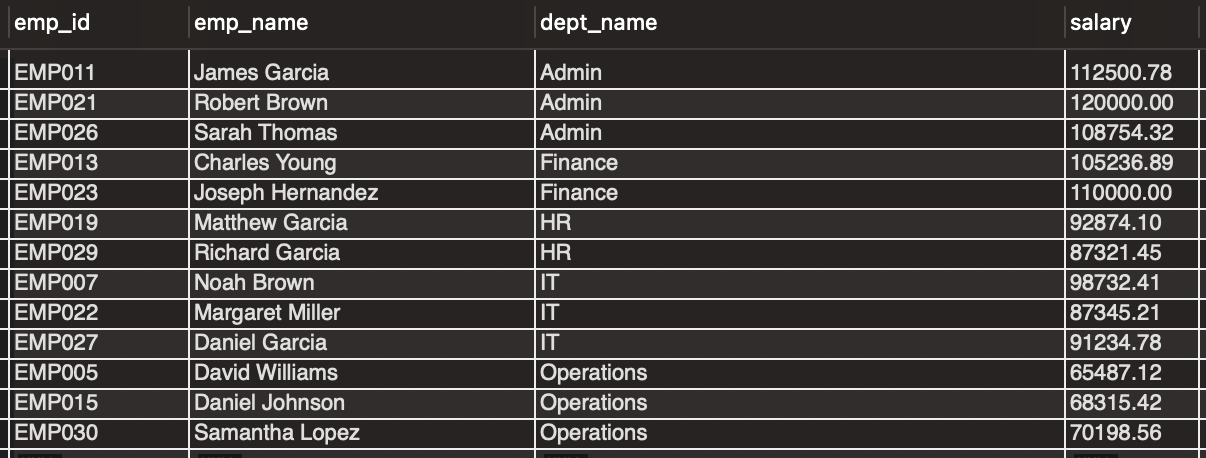 Result 5
Validation
In order to validate the above query result, let's take a department say 'Admin'. The find the average salary of the employees under Admin department.
select avg(salary) from employee e2 where e2.dept_name = 'Admin';
 Result 6
Then, get all the employees under 'Admin' department.
select * from employee where dept_name = 'Admin';
 Result 7
Then, get all the employees under 'Admin' department and earns more than the average salary of the 'Admin' department.
select * from employee where salary > 103087.411667 and dept_name = 'Admin';
 Result 8
Now compare the Result 8 with the Result 5 to validate the query.
In the above SQL query, the subquery is not independent one. The e1.dept_name comes from the outer query. So, for every row in the employee table, the subquery is executed for dept*name of each row. Hence, it is not very efficient in terms of performance. But for some case corelated subquery is very useful to write complex SQL problem.
Let's consider another example.
Question 5
Find the departments which does not have any employee using coreleted subquery.
Solution 5
select *
 from department d
where not exists (
 select 1 from employee e where e.dept_name = d.dept_name);
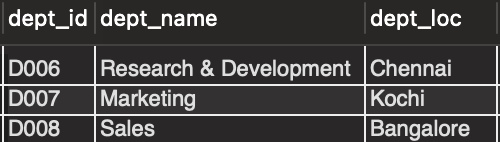 Result 9
Nested Subquery
When there is subquery inside another subquery, it is called nested subquery. Consider the following example below.
Question 6
Find the stores from the sales table whose sales is better than the average sales accross all the stores.
Solution 6
The solution of the question can be devided into following parts:
- Find the total sales of each stores.
select store_name,
 sum(price_amount) as total_sales
 from sales
group by store_name
order by store_name;
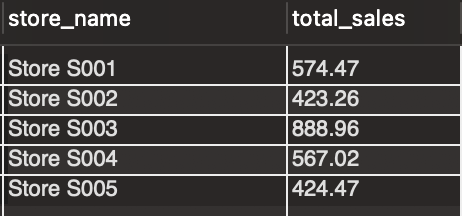 Result 10
- Find the average sales across all the stores.
select avg(total_sales)
 from (select store_name,
 sum(price_amount) as total_sales
 from sales
group by store_name
order by store_name) accumulated_sales;
 Result 11
- Compare the total sales of each store with the average sales value.
select *
 from (select store_name,
 sum(price_amount) as total_sales
 from sales
group by store_name
order by store_name) accumulated_sales
join (select avg(total_sales) as average_sales
 from (select store_name,
 sum(price_amount) as total_sales
 from sales
group by store_name
order by store_name) accumulated_sales) avg_sales
on accumulated_sales.total_sales > avg_sales.average_sales;
 Result 12
WITH clause in SQL query
In the last query, the part of the SQL - (select store_name,
sum(price_amount) as total_sales
from sales
group by store_name
order by store_name) accumulated_sales is repeated twice. In order to remove the repeatition and to write clean and readable SQL query, we often use WITH clause in SQL query.
The WITH clase is sometimes called as CTE (Common Table Expression) or Subquery Factoring.
Now, we will write the above query using WITH clause as follows:
with accumulated_sales (store_name, total_sales) as (select store_name, sum(price_amount)
 from sales group by store_name),
 as (select avg(total_sales)
 from accumulated_sales)
select *
 from accumulated_sales ts
 join average_sales av
 on ts.total_sales > av.average_sales;
The output of the query will be same as above Result 12.
Result 12
In the above query, there are two common table expressions - accumulated_sales (store_name, total_sales) and average_sales (average_sales) are created using subqueries. Then, the main query uses those temporary tables and produces the final result set. Here, the main query is easy to read, debug and maintain. Also the total sales subquery is executed onec and its result is stored in temporary table accumulated_sales (store_name, total_sales) which is used to generate the average sales. The SQL query is more efficient in terms of performance standpoint.
Advantage of WITH clause
- Easy to read, debug, maintain SQL query.
- Improvement in performance.
When to use WITH clause
- When a particular subquery is used multiple times.
- For Complex SQL queries.
- When fine tuning SQL query to improve performance.
How does SQL engine process a SQL statement containing subquery?
For scalar and multiple row subqueries, the subquery is independent of processing of main query. The SQL engine process the subquery first. Then, the result of the subquery is replaced in the main query. At this point the main query is executed by SQL engine.
For corelated subquery, the subquery execution is dependent of processing of main query. In this case, the SQL engine start processing the main query for each row, and replace the related value in the subquery. then the subquery processes and produces the output and it is replaced in the main query. The the whole main query is processed for the row and go for the next row.
What are SQL clauses that can hold subqueries?
Subqueries can be used in following SQL clauses:
- WHERE
- FROM
- SELECT
- HAVING
In the above examples, we already seen the use of subquery in WHERE and FROM clauses. Now, we will see the examples where subqueries are used in SELECT and HAVING clauses.
Question 7
Find all employees and add remarks to those employees who earn more than average salary.
Solution 7
Again, we can devide the solutions in following parts:
- Get the average salary of employees.
select avg(salary) from employee;
 Result 13
- Write the final query.
select *,
 (case when salary > (select avg(salary) from employee)
 then 'Earns higher salary than average.'
 else NULL
 end) as Remarks
 from employee;
In the above query, the subquery is executed for every row in the employee table. So, we can rewrite the above query using join to improve the performance. The result will be same.
select *,
 (case when e.salary > avg_salary.sal
 then 'Earns higher salary than average.'
 else NULL
 end) as Remarks
 from employee e
 cross join (select avg(salary) as sal from employee) avg_salary;
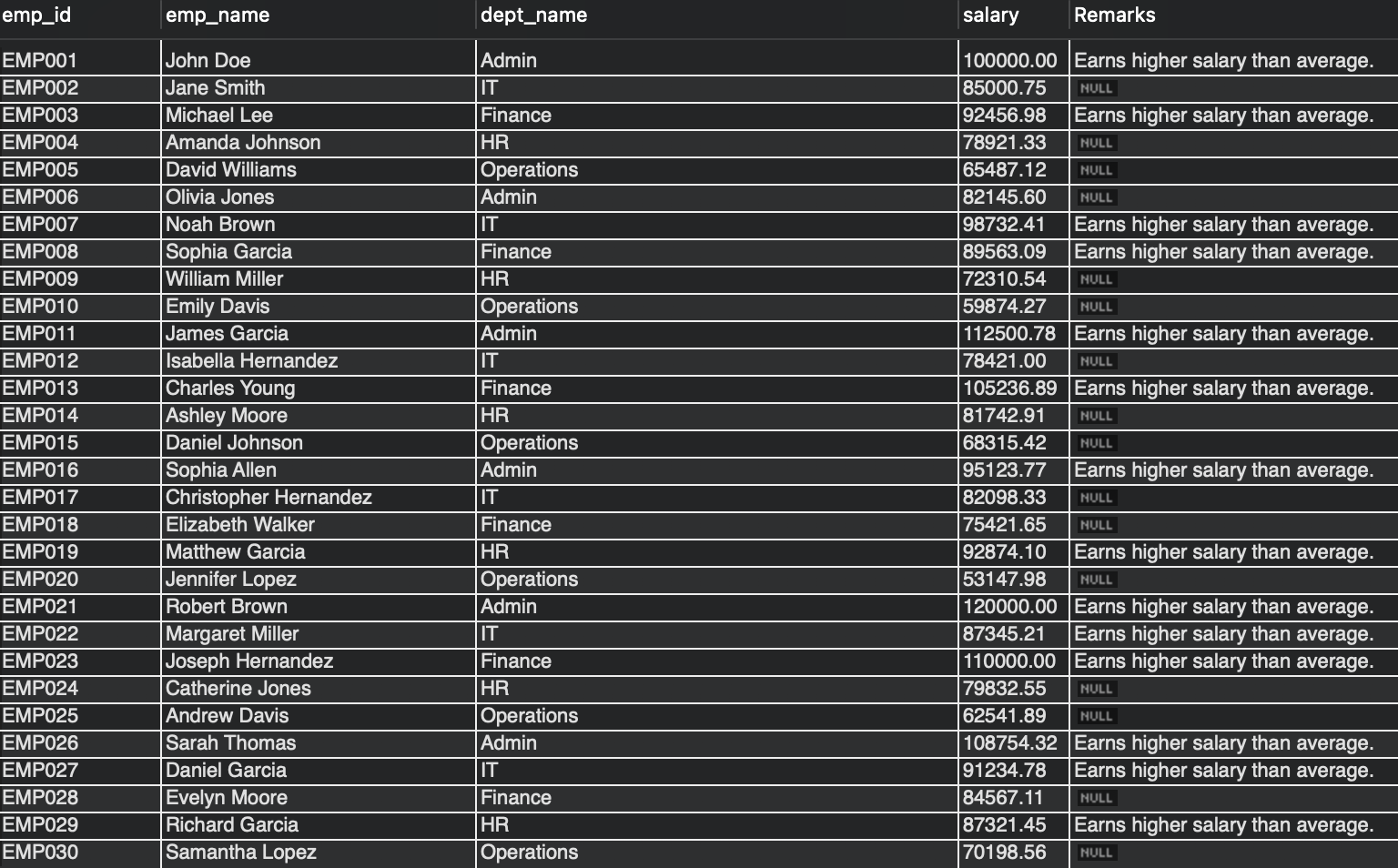 Result 14
Question 8
Find the stores from the sales table those have sold more units of product than the average unit sold by all the stores.
Solution 8
with avg_qty_sales as (
select avg(total.total_qty) as average_qty
 from (select store_name,
 sum(quantity) as total_qty
 from sales
 group by store_name) total)
select store_name,
 sum(quantity) as total_qty
 from sales
 group by store_name
 having total_qty > (select * from avg_qty_sales)
 order by store_name;
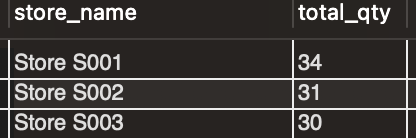 Result 15
Conclusion
Subqueries are very useful to get complex result using SQL queries. It can be used in other SQL commands like INSERT, UPDATE and DELETE statements as well. In order to fetch complex result, subqueries are indispensible approach. But extensive use of subqueries can affect the performance of the query processing in negative way. So, we need to restrict its usage (mostly usage of corelated subquery) whenever possible. The same output result we can get using joins or WITH clause instead of using subqueries. Hope you enjoy the complete lession on SQL subqueries fully! Happy Reading..
Please share your feedback, suggestion and correction to me at – bhar.debaditya@gmail.com