


Introduction
SQL is the most popular language of the relational database management systems (RDBMS) across the world. Several RDBMS packages like Oracle, DB2, MySQL, Microsoft SQL Servers, PostgreSQL etc. use SQL as the primary language to interact with database. Relational database stores data in tabuler format where data is stored in rows and columns of a table. Each row of the table represents the single entity (example: employee, customer or sales). Each column of the table represents the attribute of the entity (example: employee name of employee, customer address of customer etc.). There is some attribute or group of attributes that uniquely identifies an entity or a row in the table/entity set is called as primary key.
Sometime, one table is associated with other table(s) with common attribute(s)/column(s). Those common attibute(s)/column(s) value references the other table. It is called foreign key. Using foreign keys more than one tables are joined to get combined results.
Generally, all the commercial databases used in today's world are normalized to reduce the data redundency. So, databases are divided into smaller tables. Those tables are associated with foreign keys with each other. In order to generate a complete reports or view the whole data we need to join several tables.
In this article we will consider MySQL database. But the same knowledge can be applicable in any RDBMS packages.
SQL Join
A JOIN clause is used to combine rows from two or more tables, based on a related column between them.
Let us consider a MySQL database called as OFFICE_DB. It has following three tables:
- employee
- emp_id is the primary key.
- dept_id is the foreign key that references the department table.
- project_id is the foreign key that references the project table.
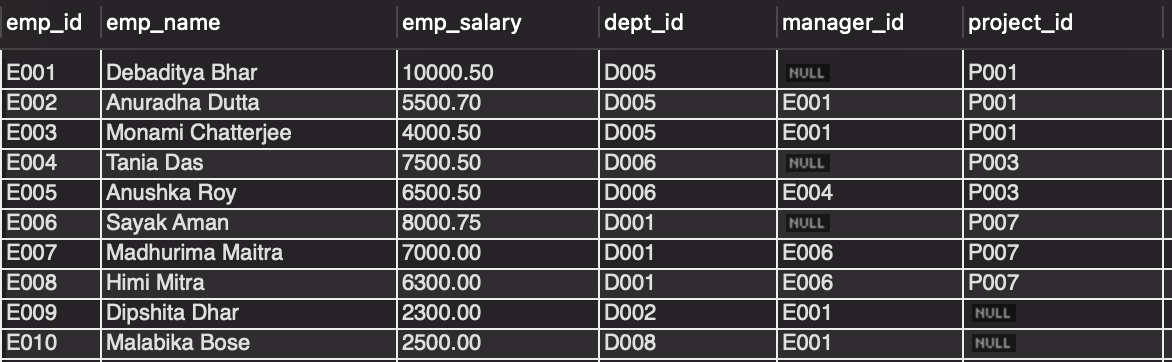 Employee Table
- department
- dept_id is the primary key.
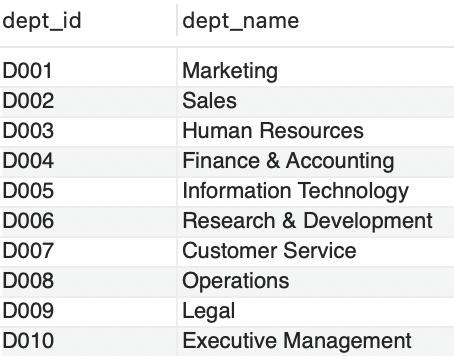 Department Table
- project
- project_id is the primary key.
 Project Table
Now, we can join the employee and department tables using join clause as follows:
-- Get all the employee name, salary and their corresponding department names.
select e.emp_name,
 e.emp_salary,
 d.dept_name
 from employee e
 join department d
on e.dept_id = d.dept_id;
The result should looks like:
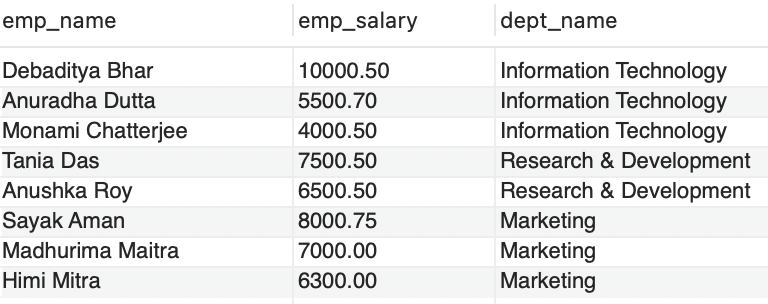 Join Query 1
SQL Joins can be several types as follows:
- Inner Join
- Outer Joins
- Left Outer Join / Left Join
- Right Outer Join / Right Join
- Full Outer Join / Full Join
- Self Join
Now, we will see each one one by one.
Inner Join
Inner join returns records those are matching in both tables.
Syntax
SELECT column_name(s)
FROM table1
INNER JOIN table2
ON table1.column_name = table2.column_name;
Examples
- Get all the employee name, salary and their corresponding department names.
select e.emp_name,
 e.emp_salary,
 d.dept_name
 from employee e
inner join department d
on e.dept_id = d.dept_id;
Inner Join
- Get all the employee name, salary, their corresponding department and project names.
select e.emp_name,
 e.emp_salary,
 d.dept_name,
 p.project_name
 from employee e
inner join department d
on e.dept_id = d.dept_id
inner join project p
on e.project_id = p.project_id;
 Inner Join with three tables
Left Outer Join / Left Join
The LEFT JOIN keyword returns all records from the left table, the coulumns from the right table are populated with the matching values or NULL for the non-matching records.
Syntax
SELECT column_name(s)
FROM table1
LEFT JOIN table2
ON table1.column_name = table2.column_name;
Examples
- Get the department names with their deputed employee names.
select d.dept_name,
 e.emp_name
 from department d
 left join employee e
 on d.dept_id = e.dept_id;
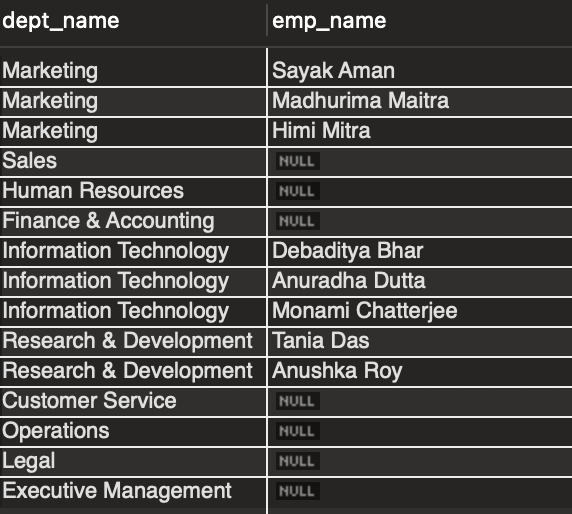 Left Join
- Get the department names where no employee is deputed yet.
select d.dept_name
 from department d
 left join employee e
 on d.dept_id = e.dept_id
where e.emp_name is null;
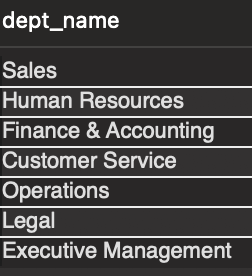 Left Join with condition
Right Outer Join / Right Join
The RIGHT JOIN keyword returns all records from the right table, the coulumns from the left table are populated with the matching values or NULL for the non-matching records.
Syntax
SELECT column_name(s)
FROM table1
RIGHT JOIN table2
ON table1.column_name = table2.column_name;
Examples
- Get the all projects with the deputed employee names.
select e.emp_name,
 p.project_name,
 p.project_start_date,
 p.project_end_date
 from employee e
 right join project p
 on e.project_id = p.project_id;
 Right Join
Full Outer Join / Full Join
The full outer join is the union of left and right join records. All the records from left and right tables are returned in the result set. The column values are NULL for the non-matching records in both of the tables.
MySQL does not support full outer join. The result of full join can be achieved using UNION keyword.
select e.emp_name,
 p.project_name,
 p.project_start_date,
 p.project_end_date
 from employee e
 left join project p
 on e.project_id = p.project_id
 union
 select e.emp_name,
 p.project_name,
 p.project_start_date,
 p.project_end_date
 from employee e
 right join project p
 on e.project_id = p.project_id;
 Full Outer Join
Self Join
In self join, a table is joined with itself.
Syntax
SELECT column_name(s)
FROM table1 T1, table1 T2
WHERE condition;
Example
- Get all the employee name with there manager names.
select e2.emp_name as 'Employee Name',
 e1.emp_name as 'Manager Name'
 from employee e1, employee e2
 where e1.emp_id = e2.manager_id
order by e1.emp_id;
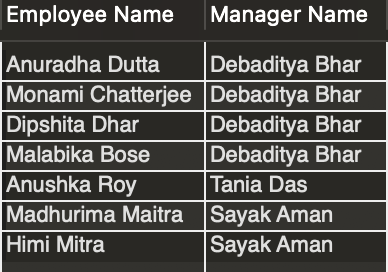 Self Join
Conclusion
SQL joins are the essential tool for data reporting and data analysis. It is widely used in every database. Some kind of outer joins are not supported in some of the database packages. But inner join and left outer join are most common and widely used in all the RDBMS packages. Please refer the specific RDBMS package descriptions for more details.
Please share your feedback, suggestion and correction to me at – bhar.debaditya@gmail.com